
Jungle theme lobby


Hello! Welcome to my lobby jungle theme lobby theme lobby jungle... Ok I stop. As you can see, this lobby is not really big but cute.

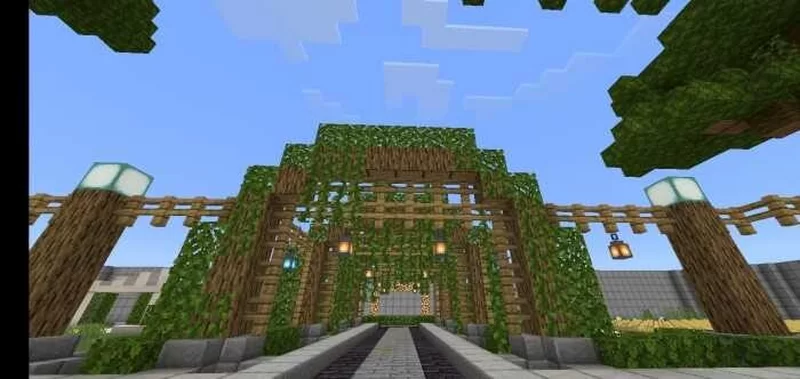
You want to know how I did this? Then keep reading...


Once upon a time, there were me... And a friend. I was creating a server for bedrock in the version... I think 1.16.?? ... But then i couldn't continue the server so all the progress got lost and the project got forgotten. But now, I'm uploading this lobby to see what you'all can do with this. I'm giving to you'all the lobby but you must make all the Minigames to keep your users or friends happy. Also remember to set all the things like prevent blocks breaking.


I'm an old map maker and i have many maps that i lost because I never uploaded'em to any website or something... I don't want this to happen with this lobby... So, to prevent, I'm uploading this here!
You can try this lobby in any version above 1.16+ ... Really. Above. Any. Only try and you will see.


Download it now on:


That's all for today fellows, good luck!

More content

Hide and Seek

Hello everyone! This map doesn't require any addon or modification to work, as it only consist of redstone and commands.  Works in any current minecraft version that supports redstone, commands, etc. So, let's explain how does the map works now!   1.-Firstly, get your family, friends, unknown people, dogs, cats or anyone that wanna play with you, to join the map with you. 2.-There are three roles; hunter, hider and game master. Game master is the one who controls what happens in the map, like how much time will hiders have to hide or how much the game will last, etc. Hunters will try to hunt the hiders by killing them and hiders will… hide… obviously. The game must be divided by 75% hiders, 20% hunters and only one game master is allowed per game. 3.-Once everyone knows their role, the game master must go first. Then goes the hiders and last goes the hunters. 4.-After all the players are in their respective lobbies, the game master must communicate with the players...

How to use the teleport command

Hey folks! Its learn time. Today, we're gonna learn how to use the teleport command in minecraft. Let's start! Please lets note Im gonna focus on the bedrock edition. Not sure if the command changes in the java edition. What it is This command allows you to teleport yourself or other players to a location on the game. By using the command /teleport, you can check it out However, remember you need to activate the cheat options in your world's settings. Take in mind that you will not earn any achievement when activating these features Using the command Once you've enabled cheats on your world, now you need to type in your chat's game /tp and then a few options will pop up; ty + Player name (@a/p/e/r or name) + x, y, z coordinates. Example: /ty @Hawkeye 150 70 746 Or if you want to use players instead of positions tp + @Any-Other-Player + @You or other player Example: /tp @Mickey @Hawkeye  Remember you can use your current position by replacing the position with ||| Or...

Impossible Parkour Map

Hey there! Your duty in this map is to get to the end. Nobody knows what it is there. But you're willing to beat this parkour. However, maybe someone dont want you to... WARNING: This map is for pro users only! INSTRUCTIONS AND SETTINGS: *Command blocks enabled is a must. I love to use commands on my maps, right? *You can play with unlimited amount of friends (Even in a server if you wanna import the map in) WARNING 2.0: MAP CAN BECOME SPOOKY! Take this in your mind when playing. Someone dont want you to get to the end of this parkour and he will do its best to prevent you from end this map. This is a basic parkour map with a bit of puzzles. Dont expect anything out of this world Any minor bugs won't be fixed. I have better projects working on rn Download it now on: Planet Minecraft